Home » Consumer News » Recent Articles:

Netflix Raises Prices for Unlimited Streaming + DVD-by-Mail Service

Phillip Dampier July 12, 2011 Consumer News, Online Video 22 Comments

Netflix has dramatically raised prices for their customers who subscribe to both unlimited streaming and renting DVDs-by-mail, several months after their last rate increase.

The company today announced it was unbundling discounts for its plans that include both online video streaming and DVD rentals-by-mail.  Under the old pricing, customers could watch an unlimited amount on online content and still get one DVD at a time mailed to them for $9.99 per month.  Effective today, that same plan will cost $15.98 — a $6 monthly increase.

According to Netflix’s Jessie Becker, the company is effectively pushing customers through pricing to either renting all of their DVD’s by mail or going with unlimited streaming.  Doing both will carry a significantly higher price.

“We are separating unlimited DVDs by mail and unlimited streaming into separate plans to better reflect the costs of each and to give our members a choice: a streaming only plan, a DVD only plan or the option to subscribe to both,” Becker writes on Netflix’s blog. “With this change, we will no longer offer a plan that includes both unlimited streaming and DVDs by mail.”

That’s not exactly true, however.  Netflix is still selling combined plans, just at substantially higher prices.  A three-DVD-by-mail plan that includes unlimited streaming used to cost $19.99 a month, but will now be priced at $23.98 a month, a four dollar increase.

The new pricing does not include the very steep price increases forecast by Wall Street for unlimited streaming.  Content creators, especially large Hollywood studios, expect to aggressively negotiate for dramatically higher fees to renew contracts for Netflix video streaming rights.  Most anticipate Netflix will need to raise streaming prices to cover those costs in the near future.

Customer reaction?  Overwhelmingly hostile, with many threatening to cancel service in favor of Amazo, Hulu, or even Redbox.

Among the comments:

This is a 60% price increase. Netflix sure has some audacity to think they can get away with a 60% price increase in this economy. I currently have the $9.99 one-DVD plus streaming plan. Sept 1st I will have to pay $15.99 ? Not gonna happen. I’ll cancel one or both services. There are other options (I have Tivo, Apple TV, Amazon Prime, etc.) Netflix has peaked. They are going to blow it.

You can spin this any way you want, Netflix, but it comes down to simple greed. With limited new content on your streaming service, I will be definitely be canceling that and will probably cancel DVD service as well just on principle. Time to sign up for Hulu Plus! Go ahead and change your name to Blockbuster, because with more stupid decisions like this, it’s only a matter of time before you go by the wayside like they did.

60% increase, practically overnight, to get the same service I get now? That sucks. If I rented more than one or two DVDs a month, it might be worth it, but I only use the DVDs as a fallback when the movie I want isn’t on streaming, and they often take several days to arrive. If you had your entire catalogue on demand, then I could pick between two options, but you’re forcing me (and a lot of other customers) to pay full price for both in the hope of getting one complete service. You already increased prices at the beginning of the year, and this kind of hike six months later is unacceptable. Hulu is starting to look very good.

Congratulations. You’ll probably be losing our household subscription. We’re long-time members (since 2002) on the Unlimited 3-disc plan. We just started streaming more because we finally have a game system set up in the living room. However, with these “changes” we’ll no longer be able to afford both. So why bother to keep either? Thanks, a lot, Netflix. I really bloody hate you. And that’s sad because until this year, I didn’t have many complaints about your company. Why the hell can’t you just leave things as they are? If things aren’t broken, don’t fix them. 🙁

The only way I will be sticking with Netflix then is if they offer newer titles and ALL titles in just streaming. Because I’m not paying 15.98 for what I get now at 9.99. This doesn’t make sense. THe only reason I signed up is because I thought “9.99 a month. I can do that.” but 15.98 a month with my minimum wage job, having to pay for college, gas, insurance, cell phone. I’m not adding an un-needed 15.98 a MONTH netflix bill. Count me out.

So, my 2-at-a-time with streaming and Blu-ray plan currently costs $17.99 (up from $16.99 last year and $13.99 when I first joined in 2008). Under this new scheme, I get no new features or services, but I have to pay $22.98? Um, no thanks… I think I’ve had enough.

The whole point is that we use the streaming primarily and only order a DVD when you don’t have it available for streaming… thus the $2 per month for DVDs makes perfect sense.  You guys have really messed up here.

Hawaiian Telcom’s Top Secret Cable TV Service: How Much, Where Service is Available Company Won’t Say

If this is a new way to attract customers, it’s sure stumping marketing experts who are questioning Hawaiian Telcom’s launch of its new cable TV service to compete with Time Warner Cable’s Oceanic Cable.  Nobody knows where exactly the service is available for sale, or for how much, and HawTel officials are not saying.

“If you call Hawaiian Telcom and ask them about the service, they essentially say ‘don’t call us, we’ll call you’ and they are the phone company!” says Oahu resident and Stop the Cap! reader Dan Ho, who first discovered HawTel was getting into the cable business from Stop the Cap!  “I realize we’re talking about another form of U-verse here, but that could still be a good thing for Hawaiians who cannot get Oceanic Cable and are stuck with HawTel’s awful DSL service.”

HawTel’s new fiber-copper hybrid network tested successfully for 250 mystery families who participated in a secretive beta-test.  The new service is expected to be sold mostly in a packaged bundle with extra high speed DSL (presumably up to 25Mbps), a central DVR terminal that can record up to four shows off the company’s digital cable TV package concurrently, and unlimited phone service.

Lester Chu, a HawTel spokesman, wouldn’t tell reporters the prices for the new service, instead offering to accept bills from competing providers and allowing HawTel to competitively bid for your business.  The company also wouldn’t say where the service was for sale, “for competitive reasons,” added Chu.

But HawTel has been licensed to provide service on the island of Oahu, and intends to rollout the service in contiguous service areas, so once the first new customers do go public, we’ll be able to ascertain where the service is slated to be delivered next.

HawTel says they will begin targeted advertising to alert residents when the service will be available.  That traditionally means direct mailers, door hanger tags, and door-to-door visits from sales teams hired by HawTel.

“It’s a crazy way to build excitement for the product, by keeping it a secret,” Ho believes. “More important, I suspect their pricing is not going to be very good if they require customers to bring in a current bill from a cable competitor in order to get a quote.”

Ho should know, he’s a marketing professional himself.

“I suspect the company wants face time with a customer to explain away the lack of visible savings by instead talking up the features they will offer that Oceanic Cable does not,” Ho suggests.

Among those features – the four-recordings-at-a-time DVR, the 250-channel all digital lineup, and the presence of NFL Network, a network Time Warner Cable systems have perennially refused to carry on their basic digital tier because of its cost.

[flv width=”480″ height=”290″]http://www.phillipdampier.com/video/KITV Honolulu Hawaiian Telecom Bring Cable Competition To The Islands 7-7-11.mp4[/flv]

KITV-TV in Honolulu opened their newscast with the mysterious launch of Hawaiian Telcom’s new TV service.  (2 minutes)

[flv width=”360″ height=”290″]http://www.phillipdampier.com/video/KHON Honolulu Hawaiian Telcom launches cable TV service in select location 7-7-11.mp4[/flv]

KHON-TV in Honolulu covers HawTel’s introduction of cable competition on the island of Oahu, even though company officials won’t say where it’s available or for how much.  (Loud Volume Warning!) (1 minute)


How to Get Verizon Wireless’ 4G $30 Unlimited Use Hotspot Feature Added to Your Account

We have received dozens of e-mails from readers trying to add Verizon Wireless’ coveted 4G $30 unlimited-use Mobile Hotspot feature to their accounts, with varying results.  We’ve compiled, with the help of our readers, a guide to assist you in scoring the only good thing to come from Verizon’s recent changes in data pricing.  If you follow these steps, you should be good to go.

Q&A

1. What is a Mobile Hotspot and What Is Verizon offering? — Verizon Wireless offers customers a service to turn their 3G or 4G phones into a Wi-Fi provider, letting you connect your other portable devices, like a tablet or laptop, to your Verizon Wireless data connection to access the Internet over Wi-Fi.  Technically, this feature is built-in to most smartphones, but cell phone companies monetize it by charging you an extra monthly fee to use the service.  Traditionally, Verizon charges $20 extra a month (on top of your data plan) to enable this feature, and has limited it to 2GB of use per month.  Each additional gigabyte will cost you $10.  But when Verizon introduced its new 4G LTE network, early adopters to 4G phones got access to this feature for free, for a limited time.  On 7/7, Verizon’s new limited-use data plans took effect, and Verizon expired the free 4G Mobile Hotspot feature.  To placate 4G owners, it offered them the chance to continue getting unlimited use of this feature, for an extra $30 a month.

That’s a stiff price to pay on top of your monthly data plan, but because Verizon’s LTE network is currently fast enough to serve as a home broadband backup (we consistently get speeds of 11/3Mbps on LTE from our headquarters), $60 total for unlimited wireless Internet isn’t completely outrageous at those speeds.  Yes, it’s ridiculous Verizon disabled a feature built in and functional on phones in other countries, but it is the same story with other carriers as well.  We even agree with the proposition you should be able to use your unlimited data plan for anything you want, but that’s just not a reality at the moment.

2. Who exactly qualifies for the $30 unlimited Mobile Hotspot? — We have been able to confirm for sure that anyone who activated or at least ordered a 4G phone before midnight on 7/7 is qualified to upgrade to this plan.  You cannot, however, activate the plan on a 3G phone.  Only 4G models qualify.  Where things get murky is whether or not customers who currently have 3G phones can still upgrade to a 4G model after 7/7 and get this plan.  Droid Life believes the answer to this question may be “yes” based on two tweets sent from Verizon Support:

We are more skeptical, however, based on the accumulated responses we’ve collected from Verizon Wireless from our readers, which admittedly are all over the map.  Verizon reps have not been offering consistent information about the Mobile Hotspot plan since it was first announced more than a week ago.  The company is preoccupied with reassuring existing customers they were not at risk of imminently losing their unlimited data plans, an entirely different subject.

I would not upgrade to a 4G phone today in hopes of scoring this Mobile Hotspot plan unless you have the name of an employee you can use if you complete the order, try to activate the feature, and encounter resistance.  In truth, Verizon can do anything they want for any customer, new or otherwise.  The trick is finding an employee with the authority to make things happen.  Be prepared to escalate or call back if you encounter a roadblock.

3. What happens if I have a 4G phone and start a Hotspot session with a 3G signal, is it still unlimited? — Yes.  Any Mobile Hotspot session originated on this plan on a 4G phone is unlimited regardless of what network conditions you encounter, as long as you are on Verizon’s network.

4. Does this apply to mobile broadband, provided by a dongle or a MiFi device?  — No.  Only 4G smartphones qualify for this plan.

5. How many people can share my Mobile Hotspot connection at the same time? — Verizon traditionally says five, but my phone (Samsung Charge) supports up to 10 concurrent Hotspot connections.  That’s a lot, so if everyone piles on, expect some slowdowns from the shared connection.

6. Can you add and drop the featured plan and get it back later? — Verizon has not said.  The company has not responded to questions about the longevity of this plan, whether it could be withdrawn, or whether customers can add and drop it (and add it back) at will.  We see that as evidence this is a promotional add-on that is likely to be withdrawn for new customers at some point in the future.  Verizon traditionally grandfathers customers already on a plan indefinitely, which means if you have it, you can keep it.  If this feature is important to you, we recommend you add it and keep it active.  When it’s gone for new sign-ups, it’s gone.

7. I do not see the plan under Verizon’s My Services on their website.  Should I be concerned? — No.  The plan was being offered to customers initiating new Mobile Hotspot sessions on their 4G phones, but not to all.  We never found it on Verizon’s website.  The only indication it is active on your account is finding this: “4G SMARTPHONE HOTSPOT” listed on this page (to access, you must first login to your Verizon Wireless account and select the line on which the feature was ordered.)

Ordering Advice

We have found multiple methods of securing this plan, and with the thanks of Stop the Cap! reader DJ, we have even located the all-important plan number, which you can reference when contacting Verizon.  If you run into a roadblock calling Verizon customer service, or can’t get the plan added while visiting a Verizon Wireless corporate store, we have some other suggestions.

1. Customers who already had a 4G phone before 7/7 can call Verizon Wireless from your phone at 611 or 1-800-922-0204 Monday-Sunday 6am-11pm ET.  Tell them you wish to add plan code #76153 — $30 Unlimited 4G Mobile Hotspot.

2. If you activated a new 4G phone after 7/7, call VZW’s Orders & Activations Hotline at 1-877-807-4646.  Work through the prompts.  You may be prompted to accept a customer agreement and get “trapped” in a menu asking you to press “1” or “2” after accepting the customer agreement.  Press “0” and wait to be transferred to a live agent.  Tell them you wish to add plan code #76153 — $30 Unlimited 4G Mobile Hotspot.

3. If rebuffed by either, try calling 1-316-681-9940, the number to a Verizon store in Kansas that has employees active in several phone forums helping people trying to get on this plan.  They should be able to add the plan to any 4G phone account, whether you are in Kansas or not.  Again, reference plan code #76153 — $30 Unlimited 4G Mobile Hotspot.

Let us know if you still have any problems in our comments section!

Your DVR Uses More Electricity Than Many Refrigerators; The $48-120 Hidden Cost of Pay TV

Phillip Dampier July 11, 2011 Consumer News, Online Video, Video 9 Comments

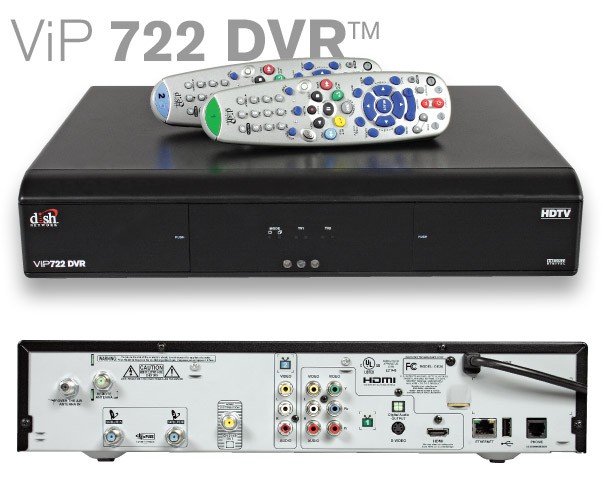
Dish Networks' ViP722: Leaving on a 60-watt bulb 24 hours a day uses just a tad more than the ludicrous power consumption of this set top box: 55W while active and 52W while in standby.

The average pay television subscriber is spending at least $4 a month in hidden electricity costs thanks to the small set top boxes found on top of many television sets across North America.  That’s more than you are paying to run a modern refrigerator.

That stunning revelation comes from a study by the Natural Resources Defense Council, financed by the Environmental Protection Agency.

Costs for residents in the northeastern United States, where electricity rates are often higher, can reach $10 per month for customers with a DVR in the living room and a traditional set top box in the bedroom.  That’s up to $120 a year in hidden charges.

The pay television industry, which has driven the set top box into millions of homes, has never paid much attention to energy consumption of their equipment, if only because they don’t pay the power bills of their customers.  The NRDC found that many boxes even attempt to fool consumers into believing they are running in a reduced-power mode, by programming them to slightly dim the front clock when the box’s “power button” is switched off.

In reality, most set top boxes use nearly as much power “shut off” as they use left on.

The cost of these little power demons to North America’s power grid exceeds 18 billion kilowatt hours. More than seven power plants could not sustain that level of power, even if running 24/7 every day of the year.  The combined electric use of Alberta and British Columbia in a year would still not match the power consumption of every set top box in North America.

These revelations have led the U.S. Department of Energy to lay the groundwork to regulate the power consumption of set top equipment.  Once again, the United States would be a follower.  Europe cracked down on excessive power consumption of electronic equipment years earlier.  In the United Kingdom, for example, satellite providers include a box that can achieve a standby status that only consumes a handful of watts.  The trade-off is that consumers have to wait up to 90 seconds for the box to re-boot every morning when the television is first switched on.  Consumers have the ability to choose different power states as a menu option on the devices.

Some cable operators program their DVR boxes to spin down internal hard drives overnight, assuming no recording is scheduled at those times.  But many of these initiatives were designed to spare the longevity of the hard drive, not reduce power consumption overall.

Popular Science dug through the data and uncovered the best reasonable options subscribers have for boxes that at least snort their way onto your monthly utility bill, as opposed to pigging out at the trough (your wallet):

If You Have Comcast

In terms of energy efficiency, Comcast comes out as the lesser of several evils, but not by much. Comcast’s most energy-efficient boxes tend to be slightly more efficient than their equivalents at Verizon, Time Warner, and the satellite companies, and they also offer more choices in terms of hardware. The NRDC’s data picks the Motorola DCH70 as the best standard-def box (sucking down 10W while active, and 10W while on standby), the Pace RNG110 as the best high-def box (13W active, 12W standby), and the Motorola DCX3400 as the best HD/DVR (29W active, 28W standby).

I spoke to a Comcast representative who told me that typically, the company installs whichever box they want, but that if you request a specific box that they have in stock, they’ll happily install that one for you. They won’t order you a box from elsewhere, and this kind of hardware rotates in and out of availability fairly quickly, but at least you might have the option to choose.

If You Have Verizon FiOS

Verizon’s most efficient boxes are just okay, while its least efficient are some of the worst of any surveyed. Even worse, Verizon gives the customer absolutely no option about which box they get–you can’t request a specific box at any point. That doesn’t matter too much for the non-DVR boxes, as the NRDC’s findings only turned up one standard-def and one high-def box, but there’s a big gap in efficiency between the company’s best and worst DVRs. The most efficient is Motorola’s QIP7216, at an unremarkably 29W active and 28W standby, but the older Motorola QIP6416 clocks in at a lousy 36W active and 35W standby.

If You Have Time Warner Cable

Time Warner has a smaller selection of set-top boxes than either Verizon or Comcast, with only one averagely (in)efficient DVR and one startlingly inefficient standard-def box. For a high-def, non-DVR box, the Cisco Explorer 4250HDC is the most efficient, at 19W active and 18W standby, but Time Warner told me that that’s an older box that might be tough to find. The Time Warner rep was (surprisingly, given the company’s lousy reputation here in New York) quite helpful, and offered to try to track down one of the 4250HDCs if that was what I wanted.

If You Have DirecTV

Here we get to the satellite folks. DirecTV’s offerings are only slightly less efficient than Comcast’s or Verizon’s, with the (currently only) standard-def box coming in at 12W active, 9W standby, the best HD box (the DirecTV H24) at 16W active, 15W standby, and the best HD/DVR (the DirecTV HR24) at 31W active, 31W standby. The DVR is pretty lousy, efficiency-wise, but that’s nothing compared to the Dish Network’s craziness.

If You Have Dish Network

I don’t know what is happening inside the Dish Network’s DVRs. Given the energy usage, they might well be powering nuclear reactors. The “best” DVR Dish offers, the ViP922, uses 43W while active, and 40W while in standby–but the worst one, the ViP722, uses a ridiculous 55W while active and 52W while in standby.

If You Use Internet Video Streaming

Many are ditching traditional cable services for online services like Netflix and Hulu, and luckily, there are a whole bunch of gadgets that can play that content (and more) on a TV. They are also invariably more efficient than a cable box, to a startling degree. The Apple TV (reviewed here), which streams Netflix and plays music, movies, and TV from Apple’s iTunes store, uses a mere 3W while active and 0.5W while in standby. Roku‘s XR-HD, which streams Netflix, Hulu, Amazon Instant Video, and a whole bunch more, uses only 7W while active and another 7W while in standby. The Boxee Box, a curiously shaped media streamer that uses the open-source, ultra-powerful Boxee software, can play Netflix, stream video from other computers on its network, play media from a hard drive or thumb drive plugged into one of its USB ports, and stream from lots of apps (with Hulu hopefully to come soon). It was tested by an Ars Technica commenter whose measurements probably differ from the NRDC’s, but roughly estimates that it uses 13W while active and 13W while in standby.

[flv width=”640″ height=”388″]http://www.phillipdampier.com/video/CBC TV boxes guzzle power 6-27-11.flv[/flv]

CBC TV took a closer look at the pay television set top box: a real power guzzler.  (2 minutes)

Verizon Yanks Auto-Delivery of White Pages in Va.; Yellow Pages Will Still Be Dumped on Your Driveway

Phillip Dampier July 11, 2011 Consumer News, Verizon Comments Off on Verizon Yanks Auto-Delivery of White Pages in Va.; Yellow Pages Will Still Be Dumped on Your Driveway

Residents of Danville, Va., may have a collector’s item dropped on their driveway later this month with Verizon’s final automatically-delivered edition of the White Pages telephone directory.

Starting in August, Verizon customers in the commonwealth will need to request a printed copy of the residential listings or else they will no longer receive a copy.

Verizon says the cessation of automatic delivery of the White Pages will save at least 1,640 tons of newsprint annually.

But before environmentalists celebrate the preservation of trees, Verizon will continue to print and drop the much-larger (and more profitable) Yellow Pages on driveways from Jonesville to Virginia Beach.

Customers will be able to order free residential print and CD-ROM versions of white pages directories by calling 1-800-888-8448 as each local yellow pages directory begins delivery.  In addition, all white pages listings are accessible at www.verizon.com/whitepages.

Despite reduced expenses for Verizon, no savings will be passed on to customers in the form of lower bills.

Search This Site:

Contributions:

Recent Comments:

Your Account:

Stop the Cap!