Home » Broadband Speed » Recent Articles:

Comcast Turns Your $7/Month Wireless Gateway Into Their Public Wi-Fi Hotspot

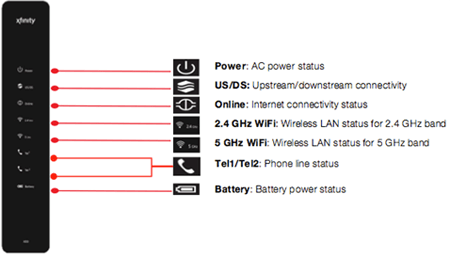
Comcast Wireless Gateway (Model 2)

An older Comcast Wireless Gateway (Model 2)

Comcast customers may soon find themselves providing free Internet access to other Comcast customers under a new initiative announced today that will turn millions of homes into Wi-Fi hotspots.

The “xfinitywifi” project will activate a second 15-25Mbps Wi-Fi signal from Comcast’s XB2 and XB3 wireless gateways that any Comcast broadband customer can reach as long as they stay within 250-300 feet of the gateway.

“We’ve been able to add certain feature functionality to the firmware of our devices,” Tom Nagel, senior vice president of business development, told CED. “The way its architected is we sort of logically split the modem in two. On the private side, you still get the same things. You can do your own security, you can manage, you can do port forwarding and all the things that no one really understands but are available to you. On the public side what happens is it’s logically a separate network. We actually provision a separate service flow to that cable modem for the public side. If that public side uses up what we’ve given them, there is no getting from someone else.”

In simplified terms, Comcast is opening up a second dedicated Internet connection for its public Wi-Fi service that will not share your existing broadband service. The two networks will co-exist from the wireless gateway, and although the available bandwidth cannot be combined to increase connection speed, customers do have the option of connecting various wireless devices to either the home Wi-Fi or public Wi-Fi connection. The public Wi-Fi service is exempt from usage measurement, caps, and/or consumption-based billing at this time. (Comcast last year suspended usage caps in all of its service areas except Nashville and Tucson.)

In beta tests, Comcast claims customers did not object to sharing their Wi-Fi wireless gateways as long as it did not affect their speed and protected their privacy.

xfinity wifiNagel says the service was designed to address both concerns, noting a 50Mbps Blast customer will still have full access to 50Mbps service, regardless of how many wireless visitors are connected to the customer’s gateway.

“There’s also no leakage of the public and private security functions as well,” Nagel said. “We do two totally different security regimes in the box and there’s really no way to get in between the two. We do provide people the ability to opt out of the service but there have been very few people that have done that, like sub fractions of 1 percent.”

Comcast enables the new service with a firmware upgrade automatically sent to customers when an area is ready for a Wi-Fi launch. Customers in Washington, D.C.; Philadelphia; Boston; Northern Virginia, Chicago, Atlanta; Delaware; and California will likely be among the first to receive the new service.

Some customers do have a problem with Comcast charging them for equipment Comcast is appropriating for its own benefit.

“This is a fine deal for Comcast, which can keep charging customers $7 a month for their gateway and benefit from millions of new hotspots they did not have to build themselves,” said Comcast customer David Tate. “If customers get wise and buy their own [gateway/cable modem], Comcast’s new Wi-Fi service will begin losing hotspots as customers return the equipment to avoid the fee. They should be charging a lot less or nothing at all for equipment if they want us to host their hotspots.”

Tate also believes Comcast will ruin its own service if they attempt to bring usage caps back.

“If Comcast brings back the cap, I wouldn’t want anyone else sharing my connection and I would avoid using Comcast’s Wi-Fi if they counted that usage against my allowance,” Tate explained. “If they exempt the wireless service from caps, customers can just connect to that network to avoid the cap so they would have a big loophole.”

Cable ONE Increasing Broadband Speeds; Expands Usage Allowances, Ends Overlimit Fees

Cable ONE broadband customers will soon benefit from the cable operator’s increased investment in its operations with faster broadband speeds and a less complicated “usage guideline” system with no overlimit fees.

The cable operator, owned by The Washington Post, has announced effective June 10, customers will be able to buy 5-70Mbps packages with allowances up to 500GB a month.

cable one speed

Cable ONE now only sells two broadband tiers:

  • 5Mbps/512kbps (3GB daily limit to avoid speed throttle) No overlimit fees ($50/month)
  • 50/2Mbps – 50-100GB monthly usage limit depending on how many Cable ONE services you receive ($50/month, $0.50/GB overlimit fee)

Starting Monday, the monthly usage allowance for the 50Mbps plan will be increased to 300GB per month and no overlimit fee will be charged. The price will remain $50 a month. Other new tiers include:

  • 60/2Mbps – 400GB usage limit ($75/month)
  • 70/2Mbps – 500GB usage limit ($100/month)

Customers will also lose the “grace period” between 12am-8am when usage was formerly not counted against the monthly allowance. Effective June 10, all usage counts 24 hours a day.

“We are very excited to launch these new, more flexible Internet plans. Our customers are spending more time online than ever before and have voiced the need for faster service and no overage charges,” said Joe Felbab, Cable ONE vice president of marketing. “We’re committed to listening to our customers and delivering the latest products and technical advancements while maintaining the highest level of reliability and customer care.”

Customers who exceed their monthly cap will not pay overlimit fees but will receive warnings from Cable ONE. If those warnings are ignored, the company will “invite” customers to upgrade to the next higher tier or convert to a business account.

Still Can’t Get Verizon FiOS in New York City? Your Landlord May Be the Problem

Phillip Dampier June 6, 2013 Broadband Speed, Competition, Consumer News, Public Policy & Gov't, Verizon Comments Off on Still Can’t Get Verizon FiOS in New York City? Your Landlord May Be the Problem

waitingStill waiting for Verizon FiOS in New York City? Are you annoyed that your neighbors have impressive broadband speeds from an all-fiber network while you suffer with DSL or cable broadband from Time Warner or Cablevision? Your landlord may be the problem.

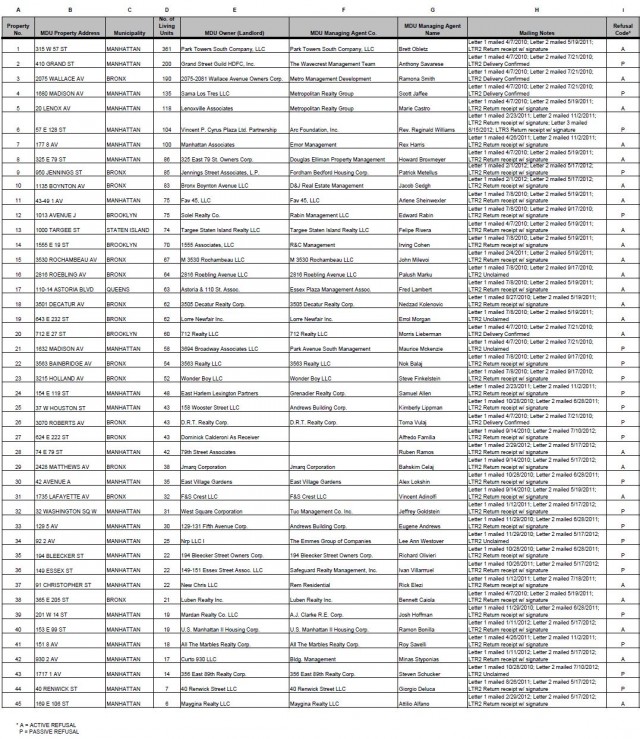
While cities upstate clamor for Verizon’s fiber upgrades, FiOS has gone unappreciated and unwanted by more than 40 building owners either blocking the company from entering their properties or ignoring repeated letters from Verizon requesting permission to begin upgrades. In many instances, Verizon has tried to make contact since 2010 with no success. Some building owners want extra compensation (sometimes to the extreme) before they will grant permission. Others don’t want the phone company performing work inside their buildings, period.

Now Verizon is appealing to the New York State Public Service Commission to ask for their intervention.

Verizon has the right to install cable television facilities, regardless of the landlord’s objections, under Section 228 of the New York Public Service Law, which states: “No landlord shall interfere with the installation of cable television facilities upon his property or premises ….”

Verizon has promised it will bear the full cost of the installation of its equipment, wiring, and other facilities to offer the service, as well as indemnify the landlord for any damage caused by the installation work.

verizon-fiosIn April, Verizon was criticized by New York City public advocate Bill de Blasio for falling behind schedule providing access to FiOS in low-income communities.

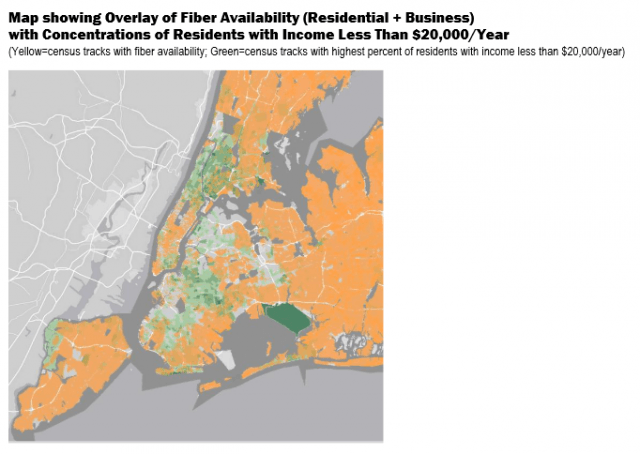
“Five years into one of the biggest franchise agreements issued by the city, roughly half of homes still have no access to fiber network connections—most of them concentrated in low-income areas like Upper Manhattan, the South Bronx, Western Queens and Central Brooklyn,” said de Blasio.

The public advocate added:

Under Verizon’s 2008 franchise agreement, all New York City residents are supposed to have access to fiber optic networks by June 2014. As a benchmark, the contract required the company to reach more than three-quarters of City residents by the end of 2012, but according to data released through the New York State Office of Information Technology Services, only half of New York City’s 3.4 million housing units had access to fiber broadband services at year’s end—putting the company far behind schedule. Brooklyn and the Bronx lagged furthest behind, with only 40 percent and 46 percent of household having access to fiber, respectively.

fiber avail

de Blasio

de Blasio

Verizon and the Bloomberg Administration dispute de Blasio’s findings, noting fiber upgrades often depend on surrounding infrastructure. Where overhead wiring predominates, Verizon FiOS is available nearly everywhere in New York City. In other areas, Verizon says it is meeting its obligations and points to landlord impediments for slowing down FiOS expansion.

But de Blasio’s maps of FiOS availability do depict a pattern of preference for FiOS service in areas where higher income residents live. In areas where average annual income is below $20,000 annually, there are obvious service gaps. Neighborhoods like Washington Heights, High Bridge, Astoria, Woodside, Bedford-Stuyvesant and Bushwick have been largely excluded from FiOS to date, according to de Blasio.

Verizon’s franchise agreement with the city only requires the company to make service available to buildings, not necessarily within them. A landlord can delay Verizon’s entry into a building or the company could choose to prioritize some buildings over others for service.

With large sections of New York covered by multiple dwelling units like apartments and condos, some could find themselves without FiOS service for several years, particularly if a property owner decides to make life difficult for the phone company.

Among the latest who have:

fios properties

On May 24, Verizon notified the PSC the following property owners had complied with their request to conduct a site survey inside their buildings and were requested to be dropped from the list republished above:

  • Sama Los Tres LLC – c/o Metropolitan Realty Group
  • Lenoxville Associates – c/o Metropolitan Realty Group
  • 2816 Roebling Avenue LLC
  • East Village Gardens
  • 194 Bleecker Street Owners Corp.
  • US Manhattan II Housing Corp.
  • 40 Renwick Street LLC

Time Warner Cable Laying Groundwork for Usage Pricing, Higher Modem Fees

Phillip Dampier June 5, 2013 Broadband Speed, Consumer News, Data Caps 7 Comments

timewarner twcTime Warner Cable has laid the foundation to eventually begin charging broadband customers usage-based pricing, raise the modem rental fee originally introduced last fall, and continue to offer customers unlimited broadband service if they are prepared to pay a new, higher price.

Time Warner Cable CEO Glenn Britt spoke at length at this week’s Bank of America/Merrill Lynch Global Telecom and Media Conference in London about how Time Warner Cable intends to price its broadband service going forward. The moderator peppered Britt with questions as investors looked on from the audience about if and when the cable company can raise prices for its broadband service or start a usage pricing plan that will generate higher revenues based on metering customer usage.

Britt

Britt

Britt repeated his earlier assertions that Time Warner Cable has no interest in capping customer usage. In fact, the company sees fatter profits from increased usage, as long as customers are willing to pay for it.

For the first time, Britt admitted customers seeking unlimited service should be ready to pay a higher cost for that option, telling the audience Time Warner would set a premium price on the unlimited tier and offer discounts to customers seeking downgrades to comparatively cheaper, usage-based pricing plans. The company hopes this new approach will limit political opposition and customer push-back.

Britt also said there is room to grow Time Warner Cable’s monthly modem rental fee ($3.95 a month), comparing it against Comcast’s current rental fee, which is $7 a month.

Britt complained that increasing usage and demand for broadband speed was requiring the company to invest more in its broadband service, something not clear on the company’s quarterly balance sheets. Real investment, except for expansion by the business/commercial services division, has been largely flat or in decline for several years. Time Warner Cable’s broadband prices have increased over the same period.

Britt also admitted that the costs to offer the service remain comparatively minor.

“In broadband there are the costs of connectivity and peering and all that sort of stuff, but they are pretty minor compared with (video) programming costs so it appears that broadband is usually profitable versus video.”

Britt also admitted the cable industry in general is increasingly dependent on broadband revenue and the profits it generates to shore up margin pressure on the industry’s formerly lucrative video service. As programming costs increase, pressure on profits increase. Yet the cable industry remains profitable, primarily because broadband earnings are making up the difference.

The meter is lurking

The meter is lurking

“I think if you look at the U.S. cable companies the EBITDA margins have been remarkably stable over a long time period,” Britt said. “The mix has [recently] changed. The video gross margin is getting squeezed, the broadband gross margin is larger and we are growing broadband so that is helping. The voice gross margin is higher than video and a little less than broadband and until recently that has been a growing part. And then we have business services which are growing rapidly and have a high gross margin.”

Additional Quotes:

Cable Modem Equipment Rental Charge: “It was received with a minimum of push-back and we’re still actually charging less than Comcast ($7/month), so I think there is room to charge more going forward. People can buy their own if they want and a small percentage of customers have chosen to do that which is fine with us.”

Usage-Based Pricing: “In order to keep up with the demand for throughput and speed which is going up every year, we are going to have to keep investing capital which we do on a regular basis, so we are going to have to figure out how to get paid for that. I think inevitably there is going to be some usage dimension, not just speed within the package, so what we have done is to put in place pretty much throughout our footprint, with a few exceptions, the idea that you can buy the standard service that [includes] unlimited usage and that costs whatever it costs, but if you want to save $5 (and that is the first thing we put in place) you can agree to a consumption limit, and we can start expanding on that.”

“I think the key to this — there has been push-back against caps in the past — I think the reason for the push-back is it was perceived in a sort of punitive, coercive fashion. The usual rhetoric is, ‘gee 20 percent of the people use 80 percent of the bandwidth or some number like that — we need to make them stop using so much.'”

“My feeling is we actually want everybody to use more, we want to invest the capital, we just want to get paid for it. So I think we should always have an unlimited offering and that should probably cost more than it costs today as the usage goes up and then people who don’t use as much should have the opportunity to save money. They don’t have to but they can, so I think that is a much more politically and consumer-acceptable way to do it than a sort of punitive thing people talk about.”

Verizon’s Defective Upgrade for Samsung Galaxy S3 Kills 4G Performance, Your Patience

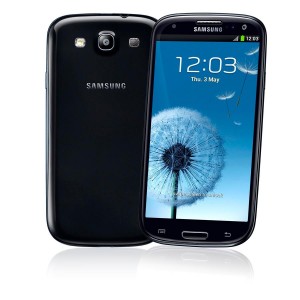
Galaxy-S3-BlackA Verizon Wireless upgrade that was supposed to fix bugs and introduce multi-screen, multi-window multitasking and new camera and image-related features to the popular Samsung Galaxy S3 instead has killed the phone’s 4G performance and dramatically decreased battery life. There are also reports some Verizon Wireless customers are finding themselves auto-enrolled in an unwanted caller ID with name add-on feature ($2.99/month) that leaves the phone connected to 3G or 4G service even when using Wi-Fi.

It was not an auspicious moment for Big Red, never fast with phone updates, particularly when Sprint customers earlier received a similar upgrade with no ill-effects.

Your editor spent two days last week attempting to mitigate Verizon’s mistakes, including several hours inside multiple Verizon Wireless store locations and talking to their national customer support center. In the end, it resulted in not one, but two factory refurbished phone exchanges and a $20 service credit for data service effectively disabled by a firmware upgrade.

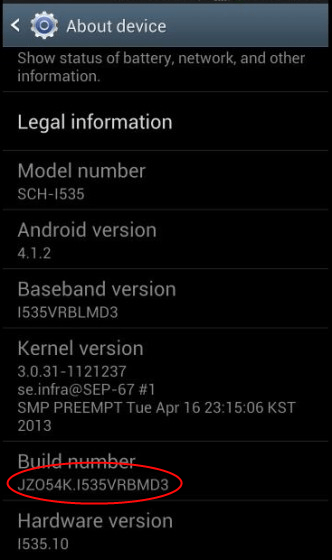
This nightmare has a name: JZO54K.I535VRBMD3 — a software update so plagued with bugs, Verizon reportedly pulled it over the weekend after customers complained it ruined 4G wireless data service, along with the phone’s performance. The 128MB update has been available for about a week for those regularly checking their phones for software updates, and some customers began being prompted to install it last Friday.

So how can you tell if you are affected? Choose Settings -> About Device and check the “Build Number” visible at the bottom of the screen. If it ends in VRBMD3, you may be impacted. Not every customer is reporting problems, which may mean some phones are not affected or the performance degradation has been dismissed as a temporary reception problem or has only subtly affected low-bandwidth applications and has gone unnoticed.

Symptoms

  1. Your wireless data signal strength meter on the phone suddenly shows much poorer reception than before the update;
  2. Your battery life has declined significantly and the battery is very warm to the touch;
  3. You have trouble loading web pages or accessing multimedia content with long buffering pauses or sudden loss of reception in places where signals used to be adequate;
  4. Messaging services seem unstable with frequent disconnects;
  5. Your phone drops from 4G to 3G service and stays connected at 3G (or less) speeds until you reset the phone;
  6. Using “Speed Test” apps result in “Network Communication Issue” errors or extremely long test times with very high ping rates, very slow/inconsistent download speeds, and trouble measuring upload speeds;
  7. You find icons for both Wi-Fi and 3G or 4G wireless service at the top of your phone at the same time;
  8. You suddenly find your account billed for Caller ID plus Name service at $2.99 a month, despite not requesting this service.

Phillip "Verizon turned by 4G phone into a 1G phone" Dampier

Phillip “Verizon turned my 4G phone into a 1G phone” Dampier

The more of these symptoms you experience, the greater the chance Verizon’s update for the S3 has temporarily left your phone a shadow of its former self.

Verizon officially recognized the wireless connectivity problem May 31 when it released an internal bulletin acknowledging the software update is responsible. The company claims it has since stopped sending it out to S3 owners (we have not been able to confirm this ourselves).

Verizon blames Samsung for the defective update. Samsung blames Verizon, telling customers software upgrades are vetted, approved, and distributed exclusively by Verizon. Customers are left over a barrel until one or both companies assume responsibility and issue corrected firmware, which could take weeks.

Verizon Wireless’ technical support told Stop the Cap! the phone’s firmware is at the heart of the problem, and although it can sometimes get phones to be more tolerant of the software update, no number of factory resets, SIM card refreshes or replacements, or settings changes will fully correct the problem. Many customers can expect continued degraded 4G performance comparable to 3G speeds (or much worse) either because of slowed performance or an unstable connection until a fix is available.

The problem with multiple icons for both Wi-Fi and 3G or 4G service has to do with a single new app Verizon has forced on their customers. “Caller ID plus Name” was added to your app list in the latest update and is responsible for the dual data connections and reported instances of customers being auto-enrolled and billed for the service, even if they never specifically ran the app.

Bloatware is bad enough, but badly performing forced apps are worse. You can permanently disable the offending app and solve the double icon problem with this simple fix:

Enter Settings -> Application Manager, and select the “All” applications tab along the top. Find “Caller ID plus Name” in the list, select it, and you will see a button to “disable” the app. This may not resolve the problem of the app auto-enrolling you for a paid feature that costs $2.99 a month, so watch your bill.
Trouble

Trouble

Affected customers with degraded service have several options:

  1. If your phone is still under warranty, and most Galaxy S3 phones are, you can request a free handset replacement. Since Verizon created the problem, ask for a free shipping upgrade to overnight FedEx delivery. Your refurbished phone will arrive without a battery, SIM card, or back cover. Use the ones included with your original phone and your replacement handset should automatically activate. Immediately after powering up, your phone will offer a series of two or three Verizon firmware updates that you can defer. Until it can be verified Verizon has stopped pushing the defective update to customers, we recommend you avoid performing these firmware updates. If you don’t, and Verizon pushes the defective update to your replacement phone, it will likely perform no better than your original;
  2. Request service credit for degraded/lost data service. Remember to also request credit, if applicable, for any Mobile Hotspot option, GPS travel, or other Verizon add-on that depends on a stable data network connection;
  3. Indicate your displeasure that Verizon did not more thoroughly test the update before pushing it on customers.

Here are the suggested fixes Verizon may attempt on your phone, but we do not believe they correct the underlying problem — only updated software will:

  • Removing the battery and “Refreshing/replacing the SIM card” may help refresh roaming rules or possibly correct a corrupted SIM card. Some customers reported this helped them get back data service they completely lost after the update, so it might help in certain cases, but probably will not correct the unstable 4G connection;
  • Clearing the cache and cookies from the web browser is unlikely to have any effect on this problem;
  • Changing the Mobile Networks setting to/from “Global” to “LTE/CDMA.” A few customers reported they got back some data service after toggling these options. The default on the Samsung Galaxy S3 running firmware from last fall was (and still remains) Global. We suspect the switch toggles the radio off and on, forcing a reconnect, which can bring back a 4G connection after the phone downshifts to 3G. But we don’t believe this will correct the speed/stability problem;
  • A “factory reset” is frankly a waste of time. This will leave your phone with the same defective firmware. If you had symptoms before, you will likely still have them after resetting your phone.

If you are reluctant to part with your phone and avail yourself of any option other than requesting a service credit while Samsung and Verizon point fingers over who is responsible and and when a fix will arrive, you can make life with your phone a bit easier with these tips:

    1. Stay on Wi-Fi when possible. Wi-Fi data performance was not affected by this software update;
    2. Expect 30-40% reduced battery life. We suspect this (and the hot battery) is caused by the phone trying to deal with unstable 4G service, as if it was in a fringe reception zone. Keep a charger handy;
    3. Try and get your phone to downshift to 3G by finding a weak reception spot (like a basement) and hope the phone drops (and remains) on 3G until it is rebooted. It appears 3G data speeds are not affected by the software bug;
    4. Expect problems when using high bandwidth applications on Verizon’s LTE 4G service. We found video next to impossible to view on 4G, but audio streaming did seem to perform at lower bit rates.

Expect web browsing on 4G to be problematic on complex web pages, which may load incompletely. Try and do your browsing on mobile versions of websites or wait until you can find Wi-Fi.


Search This Site:

Contributions:

Recent Comments:

Your Account:

Stop the Cap!