Subscribe
 CenturyLink customers should exercise caution in responding to e-mail links to CenturyLink’s online account portal. Hackers have meticulously duplicated the look and feel of the nation’s fourth largest phone company’s online account website with hopes customers will provide personal information that can be used for identity theft or fraudulent financial activity.
Trend Micro’s TrendLabs group warned readers it noticed the well-done phishing fakes popping up on several websites, preparing to collect information from unsuspecting customers. Most phishing attacks typically start with unsolicited e-mail purporting to be from CenturyLink, with a convenient link included for customers to click. Only this e-mail will not direct visitors to CenturyLink, instead diverting customers to the impostor websites that look like the real thing.
Customers can protect themselves from these phishing tricks and traps by following this advice:
- If receiving e-mail from a company asking you to follow a link to their website, you are safer typing in the company’s website address yourself, ignoring the link. Links that look authentic in an e-mail can be anything but when you click on them. If you intend to share personal information or password to log in to a website, it’s better to start your journey there yourself.
- If the site you reach shows an unexpected address in the URL window, that is often a warning sign trouble is brewing. CenturyLink’s account login screen should display either https://auth.centurylink.net/saml/module.php/core/no_cookie.php?retryURL=https%3A%2F%2Fauth.centurylink.net%2Fsaml%2Fsaml2%2Fidp%2FSSOService.php%3Fspentityid%3Dhttp%253A%252F%252Fcenturylink.net%252Fsaml%252Fmodule.php%252Fsaml%252Fsp%252Fmetadata.php%252FClient%252FLibrary%252FSaml%252Fsaml-sp%26cookieTime%3D1521251419%26RelayState%3Dhttp%253A%252F%252Fcenturylink.net%252Flogin%252F or https://eam.centurylink.com/eam/login.do. If it shows a series of numbers or a website address other than centurylink.com or centurylink.net, consider ending your visit and starting over at centurylink.com, typed into your browser yourself. When in doubt, don’t enter your login information.
- A padlock should be visible somewhere in your browser at the CenturyLink login screen. Most place the padlock at the bottom of the browser screen. No padlock? Danger.
- Any code errors on the page that show up should also be a point of concern along with spelling and grammatical errors.
In general, using up to date antivirus software and applying security patches regularly will offer some advance warning of a suspicious message. But nothing beats common sense.
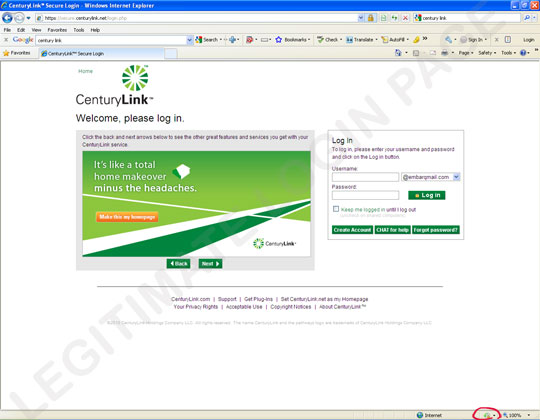
The authentic CenturyLink website. Notice the padlock circled on the right.
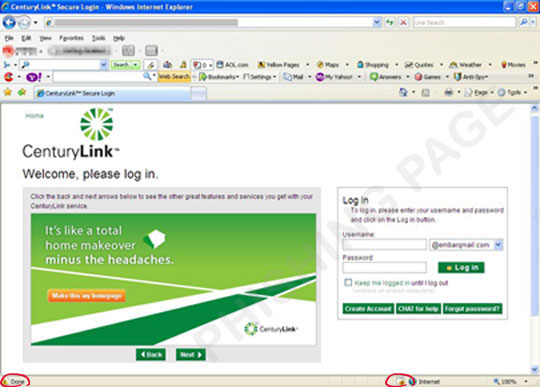
The fake version phishing for your personal information. Circled on the left is a warning of code errors on the page. On the right, notice the absence of a padlock icon.