

 Subscribe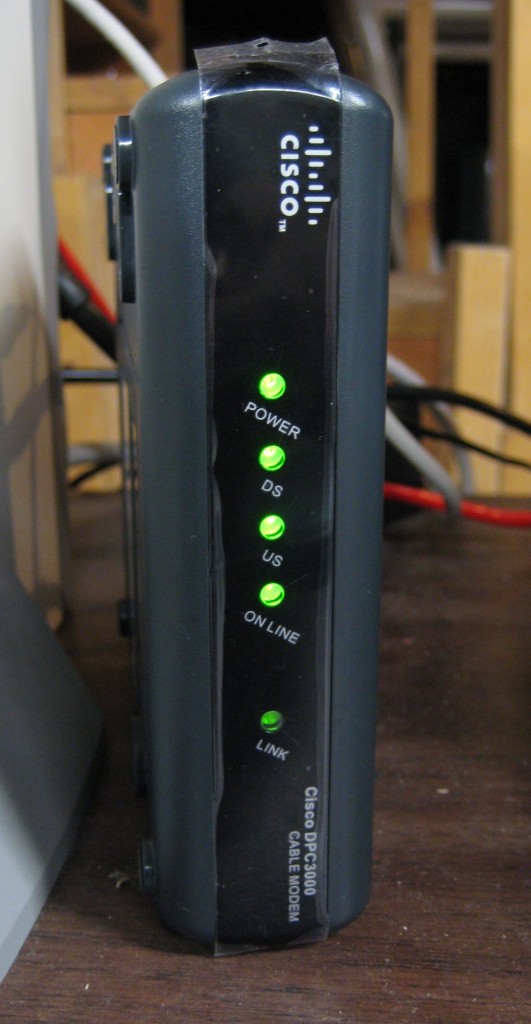
Cox Cable DOCSIS 3 modem
Cox Cable’s ‘Ultimate Internet’ broadband tier is now available to Cox customers in Rhode Island. Offering 50Mbps downstream and 5Mbps upstream, the premium speed service sells for $109.99 a month with an annual contract. The service comes as a benefit from the recent upgrade to DOCSIS 3 technology in Cox Cable’s Rhode Island service area. Cox Cable has generally unenforced usage allowances on all of their broadband service tiers. Theoretically, the ‘Ultimate Internet’ tier is limited to 300GB downstream and 100GB upstream traffic per month, but very few Cox Cable customers have ever been contacted about their usage, regardless of the amount.
Joel Evans, a Cox Cable customer living in Rhode Island, posted a review of his experience with the new Cox Cable broadband tier on Geek.com:
Before the upgrade I was peaking around 21 Mbps download and 4 Mbps upload. These were actually great speeds considering that the promised speed was really more around 20 Mbps and 3 Mbps, respectively. After the upgrade, however, I noticed an incredible speed bump. Instead of the promised 50 Mbps down and 5 Mbps up, I received 65 Mbps down and 6 Mbps up. I can only imagine that these will probably fluctuate over time.
It wasn’t until I was recently asked by Cox how my experience has been that I noticed how much of a difference more bandwidth makes. For example, I stream Hulu to my Apple TV (thanks to boxee) and usually there’s a bit of lag with the stream. Nowadays it streams right away as if I’m watching live television.
A mandatory service call by Cox Cable is required for installation, because technicians will check line quality and also swap out a customer’s older cable modem with one capable of handing DOCSIS 3 “channel bonding,” which allows multiple cable channels to be connected together to permit faster broadband speeds.
Cox plans to expand availability of the ‘Ultimate Internet’ tier to more than two-thirds of its systems by the end of 2010.

Would anyone mind showing the math on the maximum amount you could download in a month at 50Mbps, constantly downloading and how many days it would take to reach 300 GB doing this?
I’m trying to do the math on it but I’m not doing something correctly.
You would get about this It works out to about 10 bits per byte on average (with overhead this has served me well over the years). So you can download about 5 megabytes per second We will just say 30 days in a month So 60 seconds in a min, 60 mins in an hour, 24 hours in a day, 30 days in a month So 60*60*24*30*5 or 12960000 Megabytes in one month, 12656.25 Gigabytes, ~12.35 Terabytes. You can do ~17.57 gig in 1 hour. So 300/17.57 and you run out in about ~17.06 hours. Remember that does not include… Read more »
There are 8 bits to a byte not 10. 4bits = 1 nybble 8 bits or 2 nybbles = 1 byte 16 bytes = 1 word 2 words = 1 double word so on… 50 Megabits/second / 8 bits/byte = 6.25 Megabytes/ second 6.25MB/sec * 60 seconds/min = 375MB/min 375MB/min * 60 min/hr = 22,500MB/hr / 1000MB/GB = 22.5GB/hr 22.5GB/hr * 24 hr/day = 540GB/day 540GB./day * 30 days/month (average) = 16,200GB/month / 1000GB/TB = 16.2 TB/month theoretical maximum. How long will it take you to get to 300GB? 540GB/day = 300GB/ x day 300GB/540GB = .55 of a day… Read more »
Yes however with TCP overhead you end up with about 10 per (its a good rule of thumb that has served me well since the dialup days). However, now that I think about it you are right they would ding you for the overhead too. I usually discount the overhead so I can figure out what I would really get. When saturating a 100mb Ethernet line I usually end up with ~9.8MB per second download. But that does not include the overhead. So my bad it was part of my assumptions and I should have stated that. From http://www.t1shopper.com/tools/calculate/downloadcalculator.php ‘Layer… Read more »
My calculations are based on a theoretical maximum. Most people won’t get exactly 50Mb/second but around 98%-99% of that. However, with my line, 12Mb/sec, when downloading from Usenet, I get over 12Mb/sec. I usually get 12.1 to 12.3Mb/sec. I don’t know if that is due to the Xzver compression my usenet server uses, Astraweb, or what. Ok, now I understand what you are saying. Yea, the ISP, would count that overhead in there too. They sure as hell wouldn’t give you a break on it. For the average user, there shouldn’t be a problem but for the average user, you… Read more »
Don’t forget about gimmicks like SpeedBoost which give you a burst of bandwidth up to something like 24Mbps for the first 10MB on standard Road Runner. Comcast and others have the same concept available either for free or as an option.
While the burst is small it does fudge with the numbers a bit so calculating using the theoretical maximum is probably good enough.
Indeed hadnt taken speedboost into account. But in the end we are arguing over about 2-3 hours difference here 🙂 Which as a good swag is about 1/60th of what they sell you in the bold print. What the bold print gives away the fine print taketh away. @Tim I know what you mean about p2p. But it really just depends on the torrent you end up in. I have had many torrents max out my bw (think im at 7 or 8mb these days). Even had to throttle them a bit to get them to max out. I usually… Read more »
Yea I got my upload max at 80% and download at 90% from the optimization tutorial I read on Utorrent. The most I get is maybe 400KB/sec out of 1.5MB/sec that I can get. I guess it is the torrents I have been on. I stick mainly to Usenet anyways even though you pay for it. Usenet has many benefits that torrents don’t have. I have heard people downloading at 100Mb/sec on Usenet servers. Also, most accounts include 256 SSL encryption so your ISP or anyone else can’t spy on you or keep record of what you download. Astraweb is… Read more »
I don’t know if it was ever time based, but if you do a speed test with your RR connection you’ll find it far exceeds your promised speed and that test takes more than 3 seconds but is under 10MB of data I think (or maybe just 10MB).
Upload is not affected by SpeedBoost.
I was with TW and had their 10Mb line. Speedboost never lasted long enough for 10MB. It usually lasted for 3-5 seconds and then went back to normal. Worthless feature if you ask me.
@Tim due to inability to reply deeper: PowerBoost is really something to help get things such as streaming content buffered quickly, honestly. Nothing to really get all hyped about as I’m sure we all know. A friend of mine has RR Standard with PowerBoost. His speedtests somehow maintain 30Mbps down, 1Mbps on a good morning (at night he can’t pull any more than 14-18Mbps. Sometimes PowerBoost doesn’t even come on at night) but on tuned and optimized PCs, that PowerBoost which’ll peak a download at 3.8MB/s when the speed tests as such will only last for 4 seconds. Helps with… Read more »
@Smith6612 below My neighbor had TW, before I convinced him to get Uverse, and he couldn’t test his connection reliably without that Powerboost crap skewing his results. When I had it, TW said it would boost it for only a few seconds but I guess they might of changed it to 10MB now, from what you guys are telling me. Buffering, well I guess it depends on the website. I have a 12Mb connection now and 10Mb back in my TW days and I can’t tell a difference between 12Mb and Powerboosted 16Mb on buffered video. It did boost my… Read more »
It may be 10s not 10MB. Pretty much ever network speed test I know of takes less than 10 seconds to run so boosting your speed for the first 10 seconds would give one the impression that their connection has a sustained speed much faster than it really is. Meanwhile they are only paying for 10Mbps, so it feels like their beating the system somehow and are very pleased with their ISP giving them more speed than they’re paying for. You can test it out for yourself at http://speedtest.net/. I tried several tests to servers near me and then moved… Read more »
@Tim: I did find that if you were to kill of PowerBoost with a large file, and then start a speed test and stop the file download, it’ll give you an accurate result. PowerBoost won’t even come on until the upload test starts. Also, many of the Java speed tests and NDT speed tests I believe can run long enough to kill Powerboost off as well.
I keep getting under 14 hours to max out at 300 GB at 50Mb/sec connection….That just doesn’t seem right. If it is, this plan sucks big time.
Bear in mind you’re talking about 13.5 hours of sustained maximum throughput. In reality you probably won’t get anywhere near that and it would take a 1 to 1.5 days of constant downloading to hit the cap. Most people won’t do that and packet shaping may kick in if your connection is seen to be sustained at very high bandwidths. Let’s make it a bit more realistic. Assume a 1 hour TV show streamed from Hulu.com or any broadcast network website will be 1GB. You could exhaust your limit by only watching TV online in 300 hours or approximately 12.5… Read more »
Think about in the future a little. One true 1080p movie can be well over 20 GB, when you think about is 300 GB future proof I don’t think it is.
For a matter of fact I sent Phil a News Request about movie streaming to put up on this website. Now a days 2k resolution movies (yes, the resolution of video shown in higher end movie theaters) is what is the future. Some of my shorter videos that I’m uploading to the Internet as tests, I’ve been encoding in the H.264 codec at 19Mbps, playing at 2k resolution. Sure, the file can be big, but when you look at it, to stream a normal 2k resolution movie should Netflix adapt the codec, bitrate and resolution I’m talking about, you’re looking… Read more »
I didn’t mean to imply 300GB is a good cap. To wit there is no such thing as a good cap. I was just trying to put the numbers into an easily understandable form for everyone. I think the future of TV and movies is streaming video once we get past all this cap nonsense. I’ve already sent Amazon feedback about their downloadable videos and how I would buy movies from them if they were DRM free just like the MP3s I buy because it would save me a lot of effort and physical space if I didn’t have to… Read more »
There are ways to strip that DRM out of the movie. I had bought the movie 300 and it came with a digital copy that had DRM. I used a couple of free utilities that can be found around the net and now the DC is DRM free.
But I don’t want to reward Amazon for selling broken products. When they come to their senses than I’ll give them some of my money.
8 bits/byte * 300GBytes/month / (50Mbits/second) = 48000 seconds / month
48000seconds/month * 1 hour/3600seconds = 13.3 hours/month
That looks right to me.
so basically that connection would be good for a few days if you used it to even close of its full potential. what a waste of a plan.
I use to be COX Communication client since they introduced hi-speed in my service area. At the beginning it was great. But it did not lasted for long. 1. They forced me to switch from “Home” to “Business” plan by blocking port 80, and other well known ports so I can host my servers at home. 2. They play silly games like: “You can get static IP address on new at the time DOCSIS 1.0” and forced me to pay rent of their proprietary modem. This lie lasted for few months until their modem broke and they replaced with DOCSIS… Read more »
While i realize my following statement isn’t exactly relevant to this thread… just wanted to say (as i sit here waiting now for over 20 minutes to upload a 3.5meg file… COX is THE ABSOLUTE WORST company to ever come into existence in the entire universe. lies upon lies about their rates and speeds, the worst customer service ever imaginable, total ineptitude. i’ve never dealt with a company like COX before in their ultimate and total horribleness. they’re worse than any insurance company is on a bad day. their website doesn’t work for sh!t, the webmail is completely NOT user-friendly,… Read more »