

 Subscribe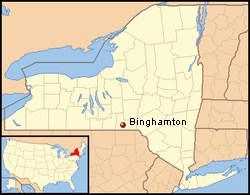
The city of Binghamton, NY offers free Wi-Fi service to its residents
The city of Binghamton, in southern New York, had an innovative idea in 2008 — to offer citizens free wireless access to the Internet across the entire downtown region, with the help of a private-public partnership. More than 20 “access points” were installed by the city and Plexicomm, LLC, a private partner in the venture. The Binghamton WiFi service launched last summer and has caught on like wildfire.
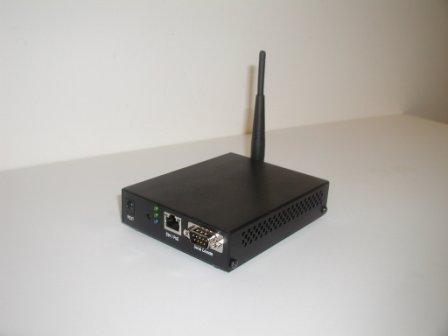
Binghamton WiFi Repeater helps extend the network
In addition to its popularity, which has tripled since 2008 with more than 82,000 logins, it’s also affordable. The city of Binghamton pays just $3,650 a month on a two year contract, with some of that cost recouped with advertising that users see when first logging into the service. The state also covered 50% of the cost for the first year. It’s also unique, because the city encourages area businesses and residents to consider helping spread the reach of the network with the purchase and installation of their own wireless repeater, priced at $199. Wi-Fi signals are generally better outside than indoors, but businesses can add the wireless repeater, placing it near a window or door, and make that signal available to customers located well within the building.
Apartment owners and even charitable consumers who believe in sharing the good fortune of free Internet are purchasing and installing repeaters to improve reception for their tenants or neighbors. In addition to the “viral network” of Internet enthusiasts sharing and expanding the network independently, the city has also been able to afford officially extending the network with additional rooftop wireless “access points.”
The project has enthusiastic support from city officials, who continue to dedicate resources to it even while other city services come under review for budget cuts.
It also allows the city to get important civic and public information out to city residents who use the service.
Binghamton’s Wi-Fi business model is based on the premise that the most successful Wi-Fi public-private partnerships are free and open to the public, sustained with “captive advertising” as customers login to the service. Customers are forced to view ads for 15-30 seconds while logging in, giving advertisers a better chance of having their messages seen by the online user.
The service is also not designed to directly compete with private providers, which include Time Warner Cable’s Road Runner service and Verizon DSL. Although the maximum speed of the network is comparable to DSL – up to 3Mbps downstream and 768kbps upstream, Wi-Fi can suffer signal-related slowdowns as well as congestion. The service is designed for web page browsing and e-mail, and light access of higher bandwidth applications such as online multimedia.
Several videos detailing the ongoing development of Binghamton WiFi can be found below the jump.
[flv width=”320″ height=”240″]http://www.phillipdampier.com/video/News10Now – Introducing WiFi to Binghamton 2-18-08.flv[/flv]
News10Now introduces Binghamton to Binghamton WiFi, a free wireless Internet service starting in March 2008. [Airdate: 2/18/2008]
[flv]http://www.phillipdampier.com/video/News10Now – Binghamton Wi-Fi Launches 3-6-08.flv[/flv]
News10Now covers launch day for Binghamton WiFi [Airdate: 3/6/2008]

4 or 5 years ago when I was frequently in Binghamton,and needed a wi-fi, there were only 2 published free wi-fi sites … Jones College Union and SUNY library. When Wegmans started putting wi-fi in their cafes I wrote to them and asked them to add the Johnson City store, and they did. Then some of the hotels added it. Bu the area was still really behind in free access. Forward to a couple of years ago when they put the downtown wi-fi in. I’ll just park somewhere and use it. No looking for a hotel or restaurant … it’s… Read more »
So the city wants people to just open up the service they are paying for to anyone that wants to use it for free?
Providers might not like subscribers giving away the service that the provider charges for. That’s assuming they are prohibited from doing so by the service they have. Is the city taking legal responsibility for any excess charges or liability for the paying subscriber giving away service?
Don’t get me wrong I like the idea of free Wi-Fi, but it should be free for all if it’s free for one.
I don’t think that is what they are doing. I think the device takes the free wireless and let’s people connect to it through your device. It effectlivly extends the wireless coverage.
The service is absolutely free of charge for every user. The only thing holding back the city from extending coverage further is a limited budget for deploying additional access points. The wireless repeaters they sell can effectively extend the network signal further, but not nearly as far as the outdoor access points. Some people have chained several repeaters together, or have placed theirs in a window on the top floor of apartment buildings, thus providing stronger signals than someone who has stuck one on a ground floor unit. If you position it in the right place, you can cover a… Read more »
Ron is correct – it is a wireless repeater.
From their website http://www.cityofbinghamton.com/department.asp?zone=Dept-Economic-Development&pid=12&pm=page
SALE OF REPEATERS AND SUBSCRIPTIONS. Repeaters are small units (like a cable box) that can amplify the downtown wireless signal for private, indoor use in either lofts and apartments, or cafes and restaurants. A repeater discretely installed near a window will allow tenants and customers to use the free Binghamton wireless service. Binghamton WiFi repeater units must be purchased through customer support, and there is only a one-time cost of .
If you guys like to experiment and get a stronger better WiFi signal, you can try making a Cantenna. My neighbor and I are going to experiment on the 6in coffee can type, which appears to be one of the easiest to make. From what I have read, you can pickup networks up to 2 miles away and the antenna outputs up to 16dbi or around that. You can also use them as repeaters but they are directional.
http://vegankid.solidaritydesign.net/2006/06/30/how-to-build-a-cantenna/
Cantennas are awesome things. Too bad they’re supposably banned in the US from what I’ve heard 🙁 But may I mention, if you have an old and unused satellite dish laying around, you can use the dish to make a cantenna. Even those small ones you get now a days from Satellite TV/Internet providers work, and they allow you to send the signal for MILES, or pick up things for miles. The only thing you really need is some wire, obviously a can/satellite dish, and a router with SMA based antennas on it.
I wouldn’t worry about any “ban.” I have fooled around with one of those Hawking “long distance” directional wireless units with a small “satellite dish” shaped antenna, supposedly for directional enhancement. I was underwhelmed with it — it did no better than a standard Linksys external USB unit. The external units you can reposition are definitely better than the internal cards or dongle type wi-fi external units. I would be surprised if a Cantenna could do up to two miles, unless you had clear line of sight between the two points (on top of a hill, across open water, etc.)… Read more »
Did you use the cantenna/usb design or do a bi-quad Phillip? I have read really good success with the bi-quad design.
http://www.engadget.com/2005/11/15/how-to-build-a-wifi-biquad-dish-antenna/
Yea I wouldn’t worry about a ban either. I highly doubt anyone is going to come knocking down my door for using a cantenna.
Hopefully, if my neighbor and I build one, he can pickup my network and we can share it for files and such.
I wasn’t too worried about any ban that might have been out there. Just pointing out something that I thought I heard about them. Otherwise, my current Linksys router is already covering most of the neighborhood with the three SMA antennas that came with the router, and the router is only transmitting at 80% power as well. I have had some weird anomalies with this router though, such as picking it up from a location nearly three miles away and being able to connect to it briefly for two seconds. Other than that, with my router, the problem usually lays… Read more »
Mr. Smith you worry to much. You do what you have to do to survive. Antennas to me are old school. 90 percent science and 10 percent art. I should know I had a 1000 watt CB linear amp. Best in the area. To this day still in use by another user I sold it to out of the city. I used parts 90 percent of the people now never heard of. Does a 3 one thousand Z final tube ring a bell with anyone and the beam power powered penthodes required to drive it. I think repeaters with very… Read more »
Oh, it’s fine. I had just remembered hearing something about those, but I do experiment with electronics myself from time to time.
Mr. Smith I don’t want to beat it to death but repeater wifi has captured my imagination. I spent a ½ hour looking at pre made antennas in those frequency spans. I found a 9 db for $10 to a 27 db for $150. The 27 db looked like a bent charcoal grill grate but very directional. Reason can antennas work so well. Phil and I live a little more then a mile away from each other and have trees all over the place. Our access I would say might be about the same. Let’s say Phil had better access… Read more »
It’s always a wonder on how you have to get signals from Point A to Point B in any location sometimes. At least Ham radio can give you some nice backgrounds when it comes down to how radio signals work, since it’s hands on (I’m a hands on type person). For a matter of fact before the DTV conversion took place, I stumbled upon a website that stated what DTV channels my PC would be able to pick up on it’s tuner, based on my exact location, and how I have my antenna hooked up. My PC itself is capable… Read more »